STYLE — Text style
 Ribbon: Annotate ▸ Text (nút mở rộng ↘)Command:
STYLEAlias: ST
A text style defines the font, default height, width factor and oblique angle. All text, dimensions and tables refer to a text style.
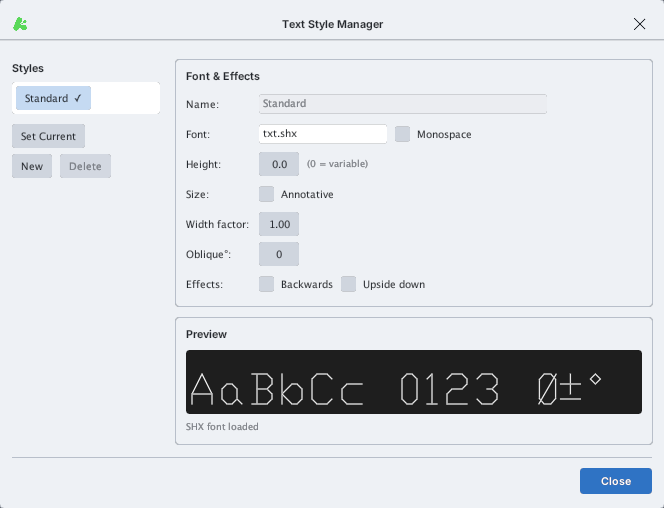
| Field | Meaning |
|---|---|
| Name | Style name (the Standard style cannot be deleted) |
| Font | Font name: SHX (txt.shx, simplex.shx…) or TrueType |
| Monospace | Fixed-pitch letters |
| Height | 0 = ask the height each time; any other value is fixed |
| Annotative | Text scales with the annotation scale |
| Width factor | 1.00 normal; <1 narrow, >1 wide |
| Oblique° | Text slant angle |
| Backwards / Upside down | Mirrored / upside-down text |
- Open STYLE (type
ST, Enter). - Click New to create a style, select a style in the list, then edit the fields in Font & Effects; watch the Preview.
- Select a style and click Set Current to use it for new text.
Where fonts are found
KufCad looks for font files (.shx, .ttf, .otf) in this order:
- The folder of the open drawing — fonts shipped with a drawing work when placed next to the DWG / DXF.
- The
fontsfolder next to the executable (kufcad/KUFCAD.exe) — the program's font folder. Copy SHX / TTF files there (e.g.romans.shx,simplex.shxfrom a machine with AutoCAD) and typeFONTREFRESHto use them right away, without restarting. - The operating system's fonts (TrueType / OpenType only).
The font list is scanned once at startup. A font that isn't found is replaced through FONTMAP, then FONTALT (Arial by default), and finally the Be Vietnam Pro font built into the program.