5. Drawing commands
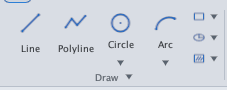
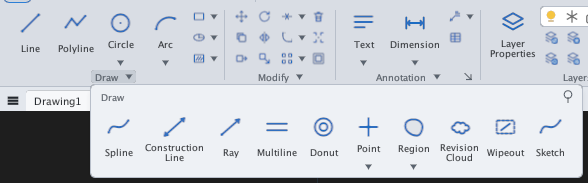
The drawing commands are on the Draw panel of the Draw tab: seven buttons in the main row (Line, Polyline, Circle, Arc, Rectangle, Ellipse, Hatch) and the slide-out — click the ▾ arrow on the panel title — holding Spline, Construction Line, Ray, Multiline, Donut, Point, Region, Revision Cloud, Wipeout and Sketch. Buttons with a small ▾ arrow (Circle, Arc, Rectangle, Ellipse, Hatch, Point, Region) open a list of variants.
| Command | Alias | Use for |
|---|---|---|
| LINE | L | Chain of straight segments |
| PLINE | PL | Polyline: lines + arcs, with width |
| CIRCLE | C | Circle — 6 methods |
| ARC | A | Arc — 8 methods |
| RECTANGLE | REC | Rectangle (chamfer, fillet, width, rotation) |
| POLYGON | POL | Regular polygon |
| ELLIPSE | EL | Ellipse and elliptical arc |
| SPLINE | SPL | Curve through points |
| XLINE | XL | Infinite construction line |
| RAY | — | Ray (infinite one way) |
| POINT / PTYPE | PO | Point and point style |
| DIVIDE | DIV | Divide into N parts |
| MEASURE | — | Place points at fixed spacing |
| DONUT | DO | Ring / solid disc |
| REVCLOUD | — | Revision cloud |
| REGION | REG | Convert closed shapes to regions |
| BOUNDARY | BO | Polyline from an enclosed area |
| MLINE / MLSTYLE | ML | Parallel strokes + multiline styles |
| SKETCH | — | Freehand sketch |
| WIPEOUT | — | Mask with background colour |
| HATCH | H | Hatching — see chapter 8 |
Entering points. Every drawing command accepts points by mouse click (with object snaps) or by typing coordinates on the command line. With Dynamic Input on, from the second point on x,y means relative; use #x,y for absolute. Details in chapter 4.