7. Layers and properties
This chapter covers managing layers and the properties of objects: colour, linetype, lineweight and transparency. The Layers and Properties panels of the Draw tab are the starting point; the Properties palette and the property-copying commands help edit in bulk.
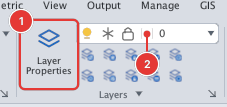
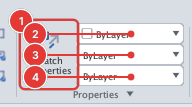
| Command | Alias | Use it to |
|---|---|---|
| LAYER | LA | The Layer Properties Manager |
| LAYERSTATE | LAS | Save / restore layer states |
| LAYOFF, LAYISO, LAYMCUR… | — | Change layers by clicking objects |
| LINETYPE, LTSCALE | LT LTS | Linetypes, loading .lin, scale |
| LWEIGHT, LWDISPLAY | LW | Lineweight |
| COLOR | COL | The Select Color dialog |
| SETBYLAYER | — | ByLayer, ByBlock, back to ByLayer |
| (panel Properties) | — | Color / Linetype / Lineweight boxes on the ribbon |
| PROPERTIES | PR CH MO | The Properties palette, editing many objects |
| QPMODE | — | Quick Properties |
| MATCHPROP | MA | Match properties |
| CHPROP | — | Change properties from the command line |
| SELECTSIMILAR | — | Select similar objects |
| QSELECT | QSE | Quick select by conditions |
| CETRANSPARENCY | — | Transparency |
Rule of thumb: leave an object's colour, linetype and lineweight ByLayer and set them on the layer; change the layer once and the whole group follows.