LAYERSTATE — Save and restore layer states
Command: LAYERSTATEAlias: LAS LMAN
A layer state is a snapshot of every layer's settings (on / off, freeze, lock, colour, linetype…) saved under a name. Use it to flip quickly between "views" of one drawing: for example a state that shows only walls for the architectural plan and another that adds electrical and plumbing.
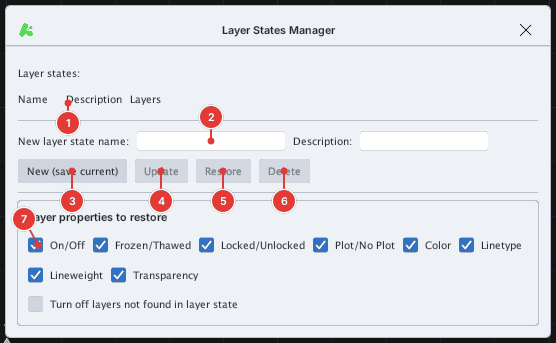
Saving the current state
- Arrange the layers as you want (on / off, colours…) with the layer manager.
- Type
LAS(orLAYERSTATE,LMAN), Enter. The Layer States Manager dialog opens. - Type a name into New layer state name 2 (and a description if you like), click New (save current) 3. The state is added to the list 1.
Restoring
- Open the dialog and click a layer state name in the list.
- Below, choose Layer properties to restore 7: tick the properties to bring back — On/Off, Frozen/Thawed, Locked/Unlocked, Plot/No Plot, Color, Linetype, Lineweight, Transparency. Also tick Turn off layers not found in layer state to turn off layers missing from the saved state.
- Click Restore 5.
Updating and deleting
- Update 4: overwrite the selected layer state with the current layer settings.
- Delete 6: delete the selected layer state.
Notes
- Layer states are saved with the drawing (DWG).
- Restoring is one undo step.