6. Modifying objects
The modify commands are on the Modify panel of the Draw tab. This chapter covers one command per page.
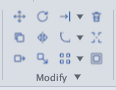
| Command | Alias | Use it to |
|---|---|---|
| TRIM | TR | Cut off the part of an object between or beyond cutting edges |
| EXTEND | EX | Lengthen an object until it meets a boundary |
| OFFSET | O | Make a parallel (lines) or concentric (circles, arcs) copy at a set distance |
| ERASE | E | Delete objects |
| MOVE | M | Move objects |
| COPY | CO | Copy objects |
| ROTATE | RO | Rotate about a point |
| SCALE | SC | Enlarge or shrink by a factor |
| MIRROR | MI | Mirror across an axis |
| STRETCH | S | Stretch part of a shape |
| FILLET | F | Round the corner between two objects |
| CHAMFER | CHA | Bevel the corner between two objects |
| BREAK / BREAKATPOINT | BR BP | Break an object between two points or at one point |
| JOIN | J | Merge objects that follow on into one |
| EXPLODE | X | Break a compound object into simple parts |
| LENGTHEN | LEN | Lengthen / shorten a line or arc by length |
| ARRAYRECT / ARRAYPOLAR / ARRAYPATH / ARRAYEDIT | — | Multiply objects into rectangular, polar or path arrays; edit arrays |
| ALIGN | AL | Move and rotate objects to fit two destination points |
| PEDIT | PE | Edit a polyline: close, width, vertices, Fit, Spline |
| SPLINEDIT | SPE | Close, open, reverse, edit control points of a spline |
| DRAWORDER | DR | Change the front / back display order |
| OVERKILL / FLATTEN | OV | Delete duplicates, merge overlapping linework; flatten Z to 0 |
| GROUP / UNGROUP | — | Group / ungroup objects |
Ending a modify command: TRIM, EXTEND and OFFSET keep running until you press Esc.
Each run of a command is one undo step: after leaving the command, type U or press Ctrl+Z to undo everything that run did.