10. Parametric
The Parametric tab attaches constraints to 2D geometry so the drawing keeps its relationships when you edit: two concentric circles, two parallel lines, a fixed dimension… There are two kinds: geometric constraints and dimensional constraints; the Parameters Manager manages the names and expressions of the dimensions.
When you apply a constraint, the object you pick second moves to satisfy the constraint with the first. A small icon next to the object shows the constraint in force (the constraint bar).
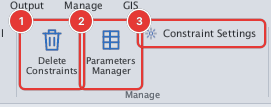
| Command | Alias | Use it to |
|---|---|---|
| GCCOINCIDENT, GCCONCENTRIC, GCCOLLINEAR, GCFIX | GCON | Coincident points, shared centre, collinear lines, fixed position |
| GCPARALLEL, GCPERPENDICULAR, GCHORIZONTAL, GCVERTICAL | — | Parallel, perpendicular, horizontal, vertical |
| GCTANGENT, GCSMOOTH, GCSYMMETRIC, GCEQUAL | — | Tangent, smooth, symmetric, equal |
| DCLINEAR, DCALIGNED, DCANGULAR, DCRADIUS, DCDIAMETER, DCCONVERT | DCON | Dimensions that drive the geometry |
| PARAMETERS | — | Names, expressions and values of the dimensions |
| GCSHOW, GCHIDE, GCSHOWALL, GCHIDEALL, DCSHOW, DCHIDE… | — | Turn constraint icons and dimension labels on or off |
| DELCONSTRAINT | DELCON | Remove constraints from objects |
| AUTOCONSTRAIN | — | Infer constraints from nearly-right geometry |
| CONSTRAINTSETTINGS | CSETTINGS | Choose how constraints are shown and solved |
| Bài tập | — | Draw a rectangle, constrain it, then change its size |