The Properties panel on the ribbon
 Ribbon: Draw ▸ PropertiesCommand:
The Properties panel of the Draw tab holds the Match Properties button and three drop-down boxes Color, Linetype, Lineweight. These boxes set the properties of objects you will draw: once chosen, everything drawn afterwards gets that colour / linetype / lineweight instead of ByLayer.
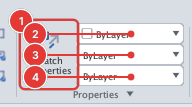
The drop-down boxes
- Color 2: ByLayer, ByBlock, the basic colours and Select Color… (choosing a colour).
- Linetype 3: ByLayer and the loaded linetypes (Continuous, Dashed, Dotted, DashDot, Center, Hidden…) (linetype).
- Lineweight 4: ByLayer and the thicknesses
0.00 mm… (lineweight).
Example: choose Dotted in the Linetype box and draw a line — the new line has its own Dotted linetype rather than following the layer. To go back choose ByLayer again. The three boxes always show the current values.
When objects are selected, picking a value in the Color / Linetype / Lineweight box changes the selected objects (as in AutoCAD); the current value for new objects stays as it was. Clear the selection (Esc) and the boxes show the current values again.
Match Properties
The button 1 runs MATCHPROP: see MATCHPROP.
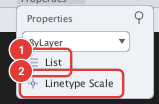
- List (
LIST): lists information about the selected object on the command line. - Linetype Scale (
LTSCALE): sets the global linetype scale (linetype).