Page Setup — named plot settings
 Ribbon: Output ▸ Plot ▸ Page SetupCommand:
PAGESETUP
A page setup bundles the plot choices (paper size, orientation, plot area, scale, style table…) under one name so many layouts can reuse them. The Page Setup Manager works on layouts; on the Model tab it only lists the page setups that exist.
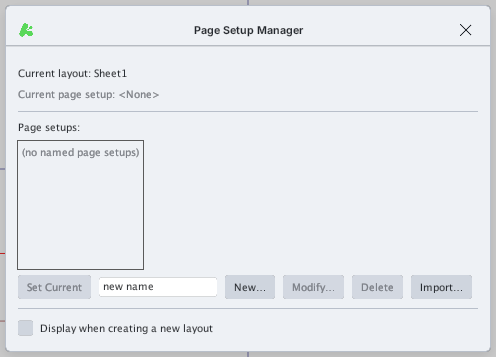
Managing page setups
- Current layout / Current page setup — the open layout and the page setup assigned to it (
<None>if none). - Page setups — the page setups in the drawing. Select a row to see its details (device, paper, style table) underneath.
- Set Current — assign the selected page setup to the current layout: the layout's paper size follows it.
- New… — create a page setup. Type a name in the box next to the button (leave it empty to get
Setup1,Setup2…) then click New…: the Page Setup dialog opens. - Modify… — edit the selected page setup.
- Delete — delete the selected page setup.
- Import… — copy the page setups from another
.dwg,.dxfor.dwtfile. - Display when creating a new layout — when ticked, the Page Setup Manager opens each time you click the + button to add a layout.
The Page Setup dialog
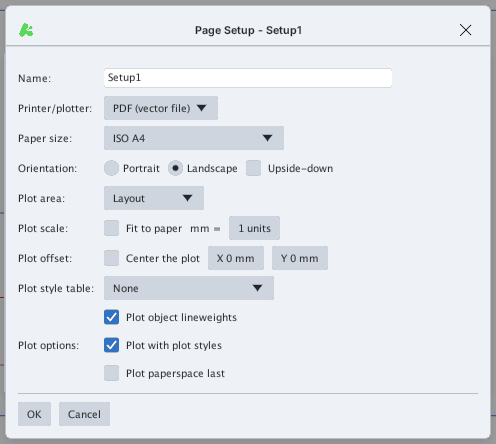
| Item | Meaning |
|---|---|
| Name | Name of the page setup |
| Printer/plotter | PDF (vector file) or an operating-system printer (click ⟳ in the Plot dialog to reload the list) |
| Paper size | ISO A4 … A0, ANSI A … D |
| Orientation | Portrait / Landscape; Upside-down turns the page 180° |
| Plot area | Layout, Extents, Display, Limits or Window — see PLOT |
| Plot scale | Fit to paper, or clear it and enter "mm = drawing units" |
| Plot offset | Center the plot or shift the plot by X / Y (mm) |
| Plot style table | None or a .ctb / .stb table — see Plot styles |
| Plot object lineweights | Plot with each object's lineweight |
| Plot with plot styles | Apply the style table |
| Plot paperspace last | Plot paper-space objects last |
Click OK to store the page setup in the list, Cancel to discard it.
The Plot dialog also has a Page setup box to pick one quickly or add a new one (Add…).