Navigation
 Ribbon: View ▸ NavigateCommand:
ZOOM, PAN, REGEN, REDRAW, VIEWRES, PLANAlias: Z, P
ZOOM
ZOOM has the options Window (drag a frame), All, Center, Dynamic, Extents, Previous, Scale (nX, nXP), Object; or none for real-time zoom with the mouse. The zoom types are also under the ▾ arrow of the Zoom button on the View tab.

ZOOM prompt.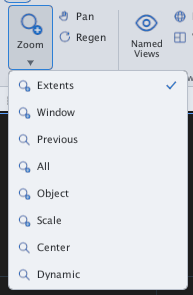
The mouse wheel zooms about the cursor; middle-button drag pans; double-click the middle button = Zoom Extents.
PAN
PAN drags the view: press and drag; Esc or Enter to leave.

PAN prompt.REGEN, REDRAW, VIEWRES
REGEN recalculates and redraws the whole drawing (the command line says Regenerating model.); REGENALL does every view; REDRAW repaints the screen; VIEWRES sets curve smoothness (1–200 %).

REGEN message.PLAN
PLAN returns the view to the 2D plan (Model plan (2D) view.).