Drawing settings
 Ribbon: Manage ▸ DrawingCommand:
UNITS, LIMITS, DWGPROPS, RENAME, STATUS, SETVARAlias: UN, REN
UNITS
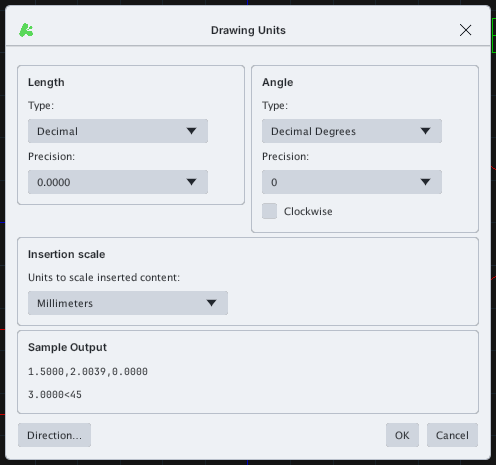
UNITS sets units: type and precision of length (Length) and angle (Angle, with a Clockwise option), the insertion unit (Insertion scale) and a preview (Sample Output). Direction… sets the zero-angle direction.
LIMITS
LIMITS sets the drawing limits: the prompt Specify lower left corner or [ON/OFF] <0.0000,0.0000>: then the upper-right corner. The area is used by Plot ▸ Limits and the grid.

LIMITS prompt.DWGPROPS
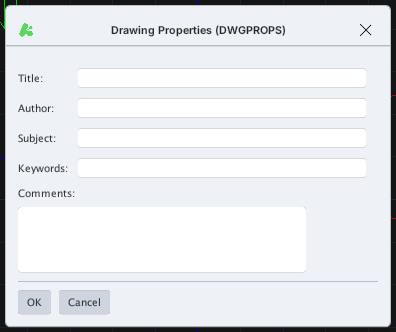
DWGPROPS stores drawing information: Title, Author, Subject, Keywords, Comments.
RENAME
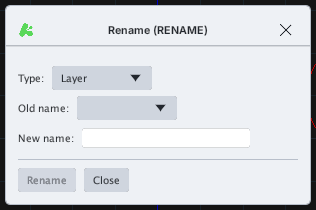
RENAME renames a named item: choose the Type (layer, block, style…), the Old name, type the New name and click Rename.
STATUS
STATUS prints to the command line the number of layers, blocks, styles, the extents and a few variables (FILLMODE, LTSCALE…).

STATUS output.SETVAR
SETVAR reads or sets a system variable: type the variable name, or ? to list them.

SETVAR prompt.