Cleanup and checking
 Ribbon: Manage ▸ CleanupCommand:
PURGE, OVERKILL, AUDIT, RECOVER, CHECKSTANDARDSAlias: PU, CHS
These commands tidy a drawing before sending it. Save a copy first.
PURGE
PURGE removes everything unused: empty layers, blocks, text styles, dim styles… The command line reports how many items were removed.

PURGE: removed 0 unused layer(s) and 0 unused block/style(s)…OVERKILL
OVERKILL deletes duplicate objects and merges overlapping collinear segments.
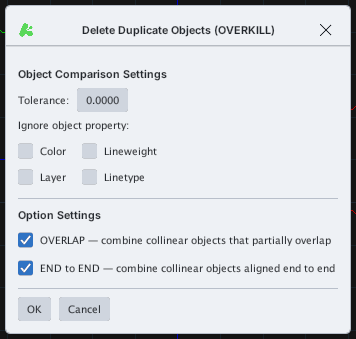
- Tolerance — comparison tolerance.
- Ignore object property — ignore colour / lineweight / layer / linetype when comparing.
- OVERLAP / END to END — merge partly overlapping / end-to-end collinear objects.
AUDIT and RECOVER
AUDIT checks for and removes invalid objects; RECOVER runs the same check (for damaged files).

AUDIT: removed 0 invalid object(s).
RECOVER reports the check result.CHECKSTANDARDS
CHECKSTANDARDS (CHS) compares the drawing with a standards file .dws / .dwg / .dxf / .dwt (layers, text styles, dim styles, linetypes), reports violations on the command line and pre-selects the offending objects. It opens the operating system file dialog: choose a standards file, or Cancel to run only the drawing hygiene check. When FILEDIA = 0 (or from a script) the command asks Enter file name: — type the standards file path, or press Enter to run only the hygiene check.