DCL dialogs
DCL (Dialog Control Language) lets a LISP program build dialogs with input boxes, lists and buttons. KufCad draws them itself, so they look the same on Windows and macOS.
The sample samples/lisp/dcl_callbacks.lsp defines the DLGTEXT (write text) command: a layer list, a Nội dung (text) box, a Cao (height) box, a Chọn điểm < (pick point) button that hides the dialog so you can click the text position, and validation (an error if empty or the height is not a number).
- Load the file with
APPLOAD(or(load "path/dcl_callbacks.lsp")). - Type
DLGTEXT.
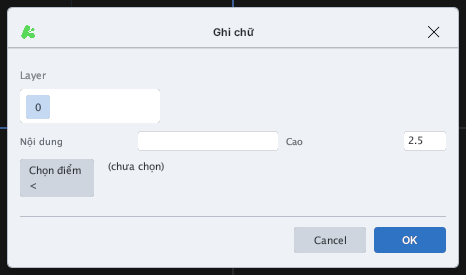
DLGTEXT dialog built by LISP with DCL.The shape of a DCL program: a string (or .dcl file) describes the layout; load_dcl_str / load_dialog loads it; new_dialog opens it; set_tile / get_tile write / read a tile; action_tile attaches an action to a button; start_dialog waits for the user; done_dialog closes; unload_dialog releases. The sample above uses all of them.