License activation
KufCad needs a license key tied to your computer. The key is checked locally; no Internet connection is needed to run.
When not activated
Each time you start without a valid key, KufCad shows the Activate KUFCAD License window over the whole interface.
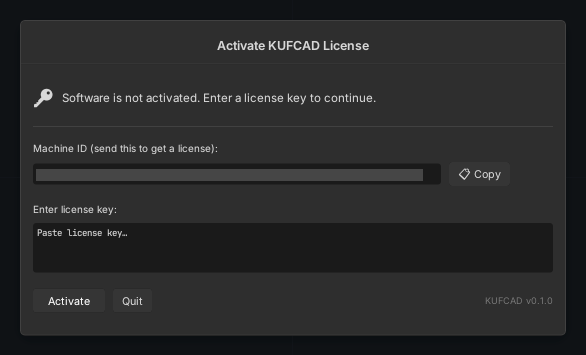
- Click Copy to copy the computer's Machine ID.
- Paste it into the license registration page on the KufCad website (free); the key — a long string — arrives by email.
- Paste the string into Enter license key and click Activate.
- The message line shows the outcome:
Activated successfully!, or an error such asInvalid license key (bad signature).,This license key was issued for a different computer.,License has expired. Please renew. - Click Quit to leave the program.
The two license types
| Type | Behaviour |
|---|---|
| Perpetual | Never expires, valid for versions of the same major line |
| Subscription | Has an expiry date, optionally with a grace period (it runs but reminds you to renew). Renew by pasting a new key. The free license from the website is this type: valid for one year, issued to the email you registered (Issued to), no grace period. From 30 days before it expires, register the computer again on the License page to get a new key for another year |
Viewing license information
Open it any time with K ▸ License….
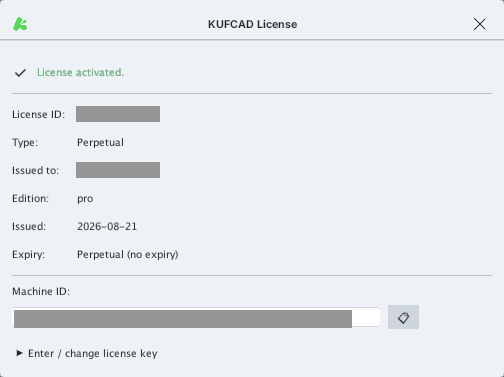
Expand Enter / change license key at the bottom to paste a new key (for example when renewing).
A key works only on the computer whose Machine ID matches. Changing the computer or its main hardware requires a new key. Do not share your key.
After activation KufCad stores the key in its configuration folder — see Configuration folder.